Hotel VoIP phone system — cloud PBX for rooms, front desk and staff
Room phones with one-touch keys, an auto-attendant and call queues for the front desk, a mobile app to coordinate staff, wake-up calls and a link to your property management system (PMS). All in the cloud: no server to maintain, from a 5-room motel to a 50,000-room hotel group.
The guest dials *222, picks a language and enters the time. If there is no answer, the room is called two more times. After the third attempt, the front desk is told.
The housekeeper finishes the room, picks up the phone and dials *299. The room turns “clean” on the front desk board and on the screen in the housekeeping room.
A room reported clean on the phone changes status in your property management system. A wake-up call entered in the PMS rings in the room. No more double entry.
No server at the hotel. From a 5-room motel to a 50,000-room hotel group.
The phone system is hosted by us. At the hotel, all you need is the phones, the network and an Internet connection.
No server to maintain
No phone system in the basement, no licences to renew, no updates to plan. Everything is managed in a web portal, and new features arrive on their own.
Redundant
Several servers, in several points of presence, instead of a single phone system in the hotel. Each phone registers on the nearest server and stays in the same PBX.
Scalable
One extension per room: add 5 or 5,000 in the portal, one by one or by bulk import. A single property or a whole hotel group, without changing systems.
The same system, at every size
5
rooms
Motel
150
rooms
Hotel
1,500
rooms
Resort
50,000+
rooms
Hotel group
Same portal, same features — and the price per extension goes down with volume.
Hotel features
Everything a hotel expects from its phones
One feature, one simple idea, one concrete example. All of it is already in the extension.
Room phone
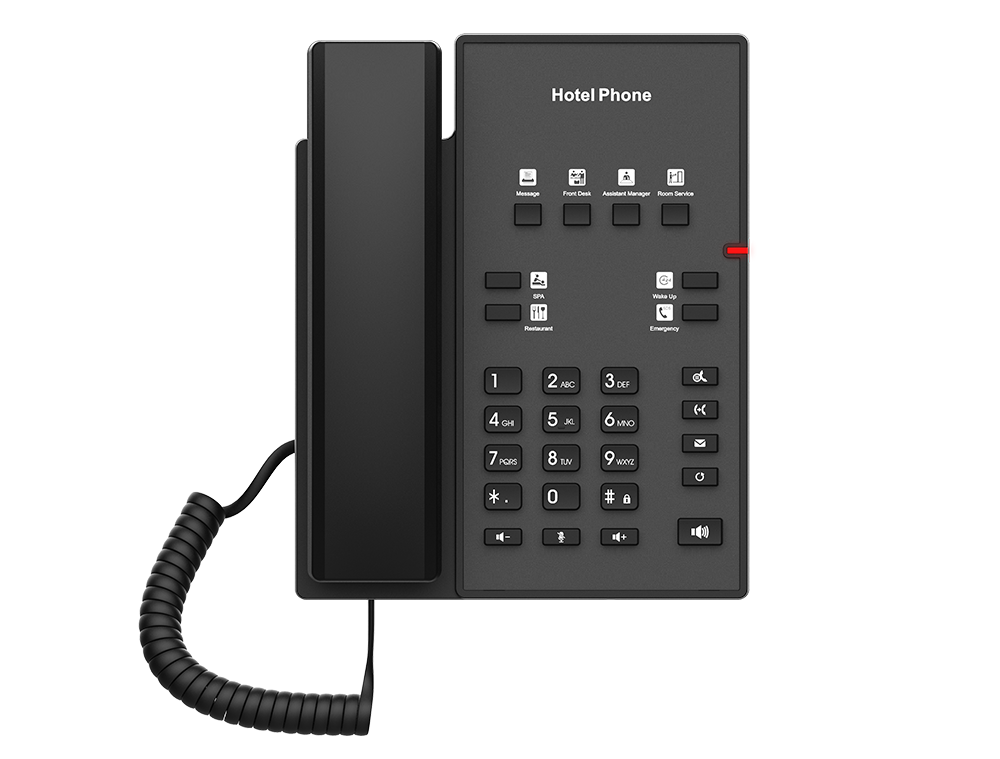
One key for each service of the hotel
The guest has no number to look up. Front desk, room service, spa, restaurant: they press one key, and the call rings in the right place.
Example of a room phone. You decide where each key rings.
Wake-up calls
Guests set their own wake-up call, in their language
They press the Wake-up key or dial *222, choose French, English or Spanish, then enter the time. The front desk can also schedule a wake-up call for them, in the portal.
*222 to set, *223 to cancel
No answer: two more attempts, 5 minutes apart
Missed wake-up: it shows in the portal so the front desk can step in
Always on hotel time, whatever its time zone
Wake-up calls
Room 204 · 6:30 a.m.
English · set by the guest (*222)
Scheduled
Room 312 · 5:45 a.m.
Français · answered on the first attempt
Answered
Room 118 · 7:00 a.m.
Español · 3 attempts, no answer
Missed
A missed wake-up call stays on screen: the front desk knows which door to knock on.
Mobile app
Improve staff coordination with our mobile app
The app turns each employee’s cell phone into a hotel extension: same colleagues, same calls, same messages.
Instant messaging
Whether it’s the front desk, housekeeping, or maintenance, your staff can send real-time updates and messages.
Mobile & remote accessibility
Staff can stay connected anywhere on the property, making communication effortless, even in the most remote corners of the resort.
One-to-one or group conversations, with photos and files
Calls and messages between colleagues: free
See at a glance who is free, on a call or ringing
The extension is ready by scanning a QR code generated in the portal
Housekeeping · 2nd floor
Front desk, Maria, Karim, Maintenance
Front desk · 10:42 a.m.
Room 214 is arriving early. Can we do it first?
Maria · 10:43 a.m.
Yes, I’ll go right after 208.
Maintenance · 10:51 a.m.
Faucet in 305 is fixed. The room can go back on sale.
Example of a group conversation in the mobile app.
Housekeeping
One code on the room phone, and the room is clean
Housekeeping carries no tablet and no radio. They dial *299 on the phone of the room they just finished: the system recognizes the room and marks it clean.
From the room phone: the room is recognized automatically
From a staff phone: *299 followed by the room number
Voice confirmation in French, English or Spanish, following the language of the extension
Every report is time-stamped and kept in the housekeeping log
1
The room is done
The housekeeper picks up the room phone.
2
They dial *299
The system recognizes the room by its phone.
3
Voice confirmation
The system confirms the room is marked clean. They hang up.
4
The front desk sees it
The room turns “clean” on the board, and in the PMS if it is linked.
Room status
Every room, clean or to clean, at a glance
The front desk sees every room on one page of the portal. One switch per room: on means the room is clean.
The front desk can change the status of a room in one click
All rooms reset to “to clean” every morning, at the time you choose (optional)
Housekeeping log: which room, at what time, from which extension
View-only access for staff who do not need to change anything
Room status
2 to clean
201
Clean
202
To clean
203
Clean
204
To clean
205
Clean
206
Clean
Switch on: the room is clean.
Wallboard
Room status on a screen in the housekeeping room
One unique link opens a live board on a TV, a computer or a cell phone. Rooms to clean are shown large, in red; clean rooms, in green.
No account to create: the link contains a long unique code
Updated every 10 seconds, without touching the screen
Read-only: room numbers and status, nothing else
Replace the link or turn it off at any time
Room statusRoom cleaned? Dial *299 from the room phone10:42
To clean 4
102204207310
Clean 8
101103104201202203205206
Example of the wallboard: rooms to clean stand out, clean rooms stay discreet.
PMS integration
Your phones and your PMS talk to each other
The housekeeper’s *299 changes the room status in your property management system. A wake-up call entered at the front desk, in the PMS, rings in the room. What is exchanged depends on the connector.
Room status sent to the PMS as soon as it is reported
Wake-up calls in both directions, with the result of the call
No software to install and no VPN: our platform connects to your PMS from a fixed address that you allow on your firewall
Check-ins and check-outs, to send the right room status
Webhook
Hotel events in your own tools
Room cleaned, wake-up call left unanswered: each event can be sent to the address of your choice, to feed a dashboard, a housekeeping app or an alert at the front desk.
Turned on in one click in the portal, with the other PBX events
Works with Zapier, Make, n8n or your own application
The content of each event is documented in the portal
Events sent
room_cleaned
Room cleaned
Room number, status, extension that dialed the code
wakeup_unanswered
Wake-up call not answered
Room number, wake-up time, number of attempts
As a JSON POST to your HTTPS address.
PMS integration
Supported property management systems
One connector per PMS family. You pick yours in the portal, enter its settings, and decide what is exchanged.
Oracle OPERA Cloud
Through the API of the Oracle integration platform (OHIP)
Room status sent to the PMS
Wake-up calls set on the phone sent to the PMS
Wake-up calls entered in the PMS ring in the room
Oracle OPERA 5 and PMS that use the FIAS protocol
Over an IP link, or a serial link with a serial-to-IP converter
Room status sent to the PMS
Wake-up calls in both directions
Result of each wake-up call returned to the PMS
Check-ins and check-outs received, to tell an occupied room from a vacant one
Oracle OPERA (HTNG)
Through an HTNG web service
Room status sent to the PMS
PMS that have a Mitel interface
We present ourselves to the PMS as a Mitel 3300 system, over a serial link with a serial-to-IP converter
Room status sent to the PMS
Wake-up calls entered in the PMS ring in the room
These connectors are new. Before go-live, we test the exchanges with your PMS, with you, until both systems agree.
Your PMS is not in the list? Hotel events are also offered by webhook, and room status works on its own, without a PMS. Tell us about your system.
Oracle, OPERA and Mitel are trademarks of their respective owners. They are named to indicate technical compatibility, not a partnership or a certification.
A project for your hotel?
Tell us how many rooms you have and which PMS you use. Our advice is free, with no commitment.
Background music for the lobby, the restaurant and the spa
Commercially licensed music stations streaming 24/7 to your speakers — fully legal for businesses, unlike a personal music account.
Standard
$14.99*/month
2 zones included
Every standard station: instrumental, lounge, jazz, acoustic, chill…
Extra zone: $4.99*/month
No extra music licence to buy or report
For the lobby, hallways, spa and waiting areas
Premium
$44.99*/month
per zone
Popular commercial music: the artists and hits your guests recognize
Public-performance royalties included in the price
Also plays every standard station
For the restaurant, the bar and the fitness centre
One zone = one location streaming at a time (lobby, restaurant, spa…). Works with Grandstream IP speakers, Sonos, Home Assistant or a network audio player connected to your amplifier. Cancel anytime, with a pro-rata refund.
* Prices in USD. Only outside calls are billed, per minute: from $0.0027/min to call Canada and from $0.009/min to receive.
We prepare the new system in parallel, so the hotel never spends a night without phones.
1
Assessment
Number of rooms, phones in place, numbers to keep and PMS in use
2
Configuration
Room and staff extensions, greeting menu, queues and schedules
3
PMS link
Tests of the exchanges with your PMS before the switch
4
Training
Front desk and housekeeping: the three codes and the portal
Frequently asked questions
Do we have to replace the room phones?
No. SIP phones work as they are. Analog phones connect through an adapter or a SIP gateway, which often lets you keep the existing wiring. We can also ship preconfigured phones and adapters.
Do we need a server at the hotel?
No. The phone system is hosted in the cloud, on several servers. At the hotel, all you need is the phones, the network and an Internet connection. The same system serves a 5-room motel and a 50,000-room hotel group.
Are calls between rooms, the front desk and staff billed?
No. Internal calls are free, whether they are made from a room phone, a front desk extension or the mobile app. Only outside calls are billed, per minute.
Can staff communicate with their cell phones?
Yes. The mobile app turns each employee’s cell phone into a hotel extension. Front desk, housekeeping and maintenance call each other and use instant messaging, one-to-one or in groups, anywhere there is Wi-Fi or a cellular network.
How does housekeeping report that a room is cleaned?
They dial *299 on the room phone: the room is recognized and marked clean. From a staff phone, they dial *299 followed by the room number. The front desk sees the change right away, in the portal and on the wallboard.
What happens if the guest does not answer the wake-up call?
The room is called two more times, 5 minutes apart. After the third unanswered attempt, the wake-up call shows as missed in the portal, and an event can be sent to your tools, so the front desk can step in.
Which PMS do you work with?
We have connectors for Oracle OPERA Cloud, for OPERA 5 and PMS that use the FIAS protocol, for OPERA through HTNG, and for PMS that have a Mitel interface. These connectors are new: we test the exchanges with your PMS before go-live. For another system, the events are offered by webhook.
Do we have to open our network to link the PMS?
There is no software to install and no VPN. For OPERA Cloud, everything goes through Oracle’s API. For a direct link with the PMS, our platform connects to your interface from a fixed address that you allow on your firewall. A serial link needs a small serial-to-IP converter at the hotel.
Is the wallboard private?
It opens with a link that contains a long unique code that cannot be guessed. It is read-only and shows only room numbers and their status. You can replace the link or turn it off at any time: the old one stops working right away.
Do you keep information about our guests?
Hotel features ask for no guest name. They keep room numbers, their status, wake-up times and the housekeeping log. The PMS link does not ask for guest names either.
Do hotel features cost extra?
No. They are included in the extension, like the rest of the PBX. There is no contract and no commitment: you add or remove extensions and numbers at any time.